You can see which scripts are giving you the “Hitch Warnings” in the FiveM F8 Console, you have to do the following:
Type in the F8 Console: profiler record 500 (500 = frames you want record, if you want to record more frames only type the frames you want to record)
Let FiveM record the frames (You can watch the status only typing: profiler status)
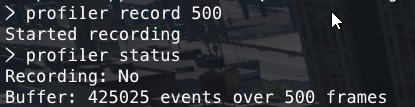
Finally, when in the profiler status appear 500/500, you can watch the info typing in the F8 Console:
profiler view
Then you are going to see a screen like this

If you want to watch the scripts that are delaying the server you have to do zoom in the yellow lines
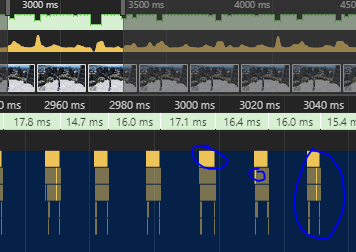
Then you have to fix the lines that appear in the yellow lines
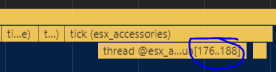
Or delete the resource if you want.

 GAZDUIRE JOCURI / VPS / GAZDUIRE WEB / SERVERE DEDICATE - Stock NELIMITAT / Valabil comandati pe